|
|
MacMidrange Client
AS/400 Client Access for the Macintosh
|

|
|
|
 MacMidrange/Client MacMidrange/Client
The Apple? Mac OS Solution
for IBM? AS/400? Client Access Connectivity
PLEASE NOTE: This is a discontinued product.
Please click here to be
taken to the Ericom PowerTerm
for Mac for Apple Macintosh connectivity.
Overview
Now you can access the AS/400 from your Macintosh with a
family of product solutions in a single integrated package. Developed around the same core
code as IBM’s Client Access for Windows and OS/2, the MacMidrange Client from NLynx
Systems is true AS/400 Client Access software for Apples’s Mac OS. MacMidrange Client
allows you to connect a Macintosh or clone to an AS/400 and perform tasks such as sharing
files, terminal and printer emulation, and to view your files in graphical format.
MacMidrange Client also supports Open Database Connectivity (ODBC) for database serving.
- Flexible terminal emulation for your AS/400.
MacMidrange
Client gives you the flexibility to meet special user and keyboard
function needs. MacMidrange Client emulation incorporates
easy-to-use functions such as cut and paste, cut and append,
and hot spots. The auto-key feature permits automatic recording
and playback of frequently used key combinations. Online
keyboard remapping allows the simple remapping of keyboard
functions. MacMidrange Client also allows on-screen, tear-off keypads for convenient
placement on the desktop. Color attributes may also be modified, and 132-column mode is
supported.
- Integrated File System Support. Manipulate
files quickly and easily with MacMidrange Client. Mount an AS/400 volume like any other
remote Macintosh volume, then create, delete, and copy files and entire folders to and
from the AS/400 with a simple click and drag of your mouse. QDLS (Office Vision) files are
automatically translated to your favorite Macintosh data format for use on your Macintosh.
- More Ways to Use Data. MacMidrange Client
lets you make more effective use of your data. Now you can arrange and organize your
databases in the ways best suited to meet your needs. The MacMidrange Client Drop Table
allows you to quickly create and retrieve databases on the AS/400. Column headings, cell
formatting, and delimiters can be automatically determined from the text file or can be
user defined.
Now You Have…
More Print Options for Your AppleTalk Printers.
- Print from the AS/400 to any AppleTalk printer over TCP/IP
3812 Printer Emulation.
- Route data to either a printer or a file.
- Preview print output regardless of output destination.
More Ways to Access and Format Data.
- Open Database Connectivity (ODBC) Driver included.
- Easily move OS/400 data into Macintosh applications for
reformatting into reports, spreadsheets, or dynamic 3-D charts.
More Security.
- Password protection for keyboard remapping and functions.
- OS/400 security applies to each user’s profile
MacMidrange Client displays only the functions and objects a user is authorized to see.
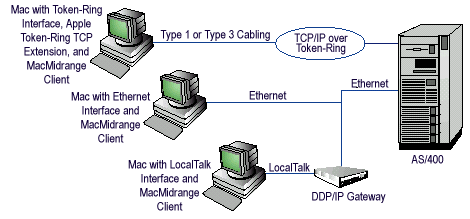
| Additional Features | Diagram
| Specifications | General |
| PC-to-Midrange Connectivity |
Return to Menu
- Custom Installation. Fast and easy installation
(can be done from a server) of all or selected modules. Uninstall capability included.
- GUI Configuration. Easily complete the
configuration process.
- File Morphing. Simply drag a file onto the File
Morph icon to convert AS/400 EBCDIC files to Macintosh ASCH format, and vice versa.
- Remote Commands. Use the familiar Macintosh GUI to
submit AS/400 commands and receive completion messages. Simplify routine tasks with Apple
Scripts.
- Service Viewer. Obtain comprehensive system
information with MacMidrange Client’s three-part viewer. The viewer creates logs and
traces, support CWBPing, checks to see if the host servers are running, and lists
installed MacMidrange Client software.
- Help System. Uses the familiar Apple Guide Help
Systems for complex functions.
Return to Menu
Return to Menu
Macintosh:
- Power Macintosh or clone running MAC OS 7.6.1
to OS 9 (OS X not supported)
- 16M of memory
- 12M of disk space depending on which modules are installed
- A connection to a TCP/IP network (Open Transport 1.1.1 or
later recommended)
AS/400:
- OS/400 V3RI or later with the required PTFs
- OS/400 V3R6 or later with the required PTFs
- A TCP/IP connection
Return to Menu
The MacMidrange Client package:
- CD-ROM
- Online installation guides
- Warranty cards
Part Number:
301-6805-001
Single User
Warranty:
NLynx limited 90-day warranty on software.
Technical Support:
No technical support as this is a discontinued
product
- TCPAxcess?:
For Terminal and Printer access from a Mac to an AS/400 through a TCP/IP
network.
- MacTwin?:
Direct Twinax: Attachment for Macintosh for Terminal and Printer
Emulation.
- NetAxcess?:
Gateway from Apple network to an AS/400 for Terminal and Printer
Emulation.
Related NLynx Products
- ETU?: File transfer utility
that resides on the S/3X or AS/400 and provides menu-driven options for transfer and
translation of data between the PC and host.
- ES/TEC-2™: Economical
IBM-compatible, plug-and-play, two-session card (requires Memory Segment and IRQ)
-
ES/3XTwin?: DOS
emulation software and 5250 adapter
-
ES/Remote™:
Software and hardware combination that allows users dial-up remote access to an IBM
Midrange System. Works in conjunction withNLynx’s Axcess/400™ Remote Access
Unit. Also available for Macintosh and DOS users.
-
ES/Server™:
Low-cost gateway, connecting via Twinax to an IBM Midrange to share seven emulation
sessions (per adapter) over an Ethernet or Token Ring LAN.
-
MacMidrange?:
Macintosh?-to-IBM midrange connectivity products that allow networked or individual
Macintosh computers to access IBM S/3X or AS/400 hosts.
|


